"This lead isn't ready." / "This lead has been cold for weeks and you still haven't called."
This tension between marketing and sales is very real in some B2B teams. And it's costly: missed opportunities, sales reps wasting time on poor leads, and a deteriorating marketing-sales relationship.
The solution isn't switching tools. It's aligning on a shared definition of MQL and SQL, and putting in place a clear workflow to move from one to the other.
In this article: the 3 scoring blocks to validate the MQL → SQL transition, a 9-step workflow, and an "SQL-ready" checklist to copy into your process. A template is available for download.
In many teams, the definition of MQL and SQL is vague or implicit. Marketing passes leads when they exceed a certain score in their tool. Sales receive them, look at them, and ignore half of them.
The problem: there are no shared criteria. Marketing and sales each have their own idea of what a "good lead" looks like, and they haven't spent enough time seriously discussing it.
A poor MQL → SQL process generates several visible problems:
The solution lies in agreeing on criteria and implementing a tracked workflow.
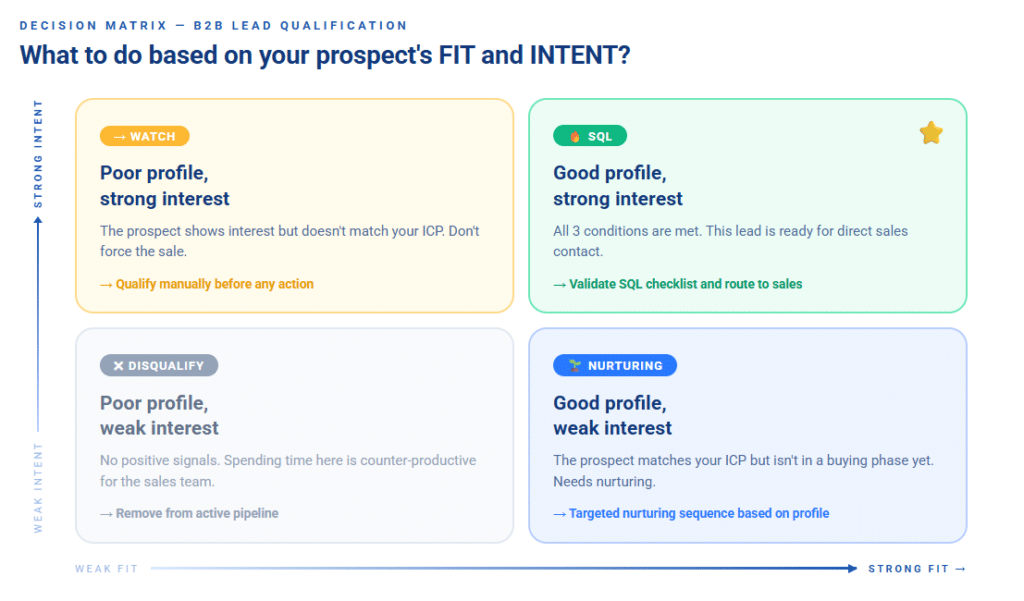
An MQL (Marketing Qualified Lead) is a prospect who matches your ideal customer profile closely enough and has shown a first level of interest to enter a nurturing sequence.
They are not yet ready for direct sales contact, but they deserve to be tracked and nurtured.
An SQL (Sales Qualified Lead) is a prospect whose profile, interest signals and timing indicate they are ready for a sales conversation. They have passed your internal checklist: right profile, active interest, identified project or need.
Moving a lead from MQL to SQL is not purely an automatic trigger based on a score. It is a decision that can combine automated scoring and human validation, particularly for high-value leads or those with partial data.
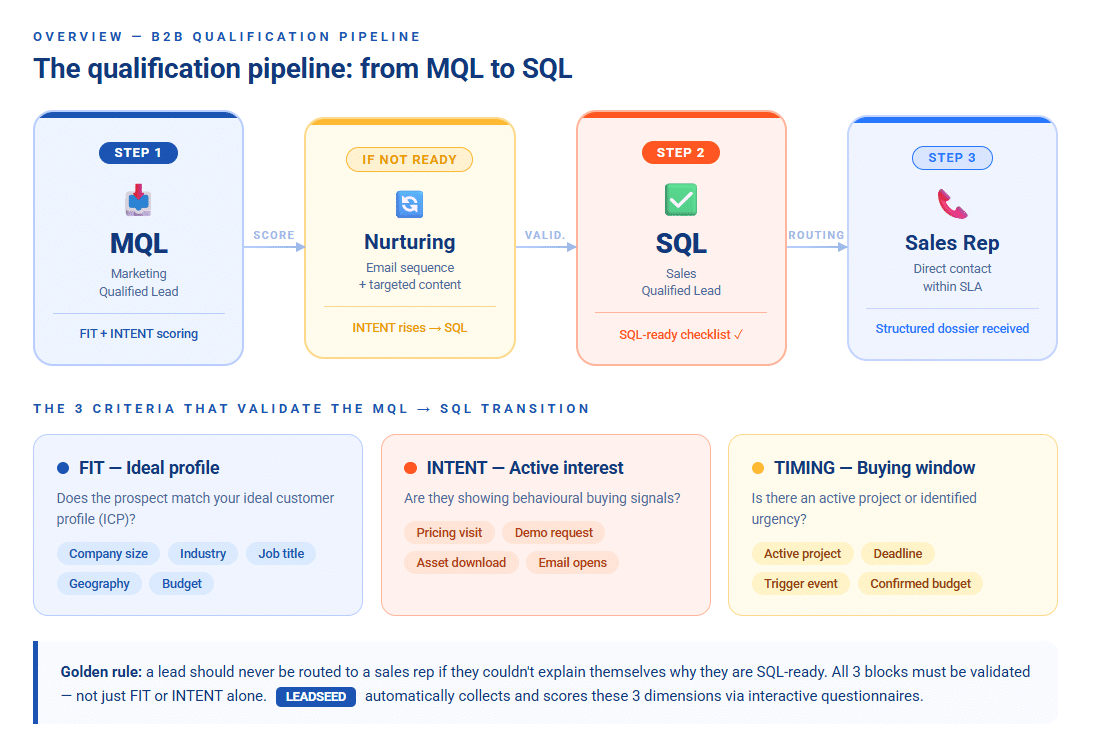
The golden rule: a lead should never be sent to a sales rep if they couldn't explain themselves why they are SQL-ready.
FIT measures whether the prospect resembles your ideal customer. These are often static criteria ; they don't change much as long as the relationship doesn't evolve.
| Criterion | MQL Signal | SQL Signal |
|---|---|---|
| Company size | Within target range | Matches ICP exactly |
| Contact role | Manager or above | Decision-maker identified |
| Industry | Listed sector | Top 3 priority sectors |
| Geography | Covered zone | Core zone |
| Digital maturity | Average level | Advanced level or declared need |
| Budget / capacity | Indirect signal | Budget mentioned or estimated |
INTENT captures behaviors that reveal genuine interest. These signals evolve over time.
| Signal | Relative Weight | Logic |
|---|---|---|
| Demo or contact request | Strong | Direct buying signal → act immediately |
| Pricing page visit (2+ times) | Strong | Clear commercial intent |
| 2+ asset downloads | Medium | Sustained engagement |
| Repeated email opens | Medium | Interest maintained over time |
| Webinar attendance | Medium | Qualified engagement |
A single strong signal (demo request) can be enough to trigger the SQL transition, provided FIT is good. A weak isolated signal (one email open) is not sufficient.
This is often the forgotten block. A prospect with an excellent FIT and strong INTENT signals can still be a poor SQL if they have no active project.
| Timing Signal | What it indicates |
|---|---|
| Active project declared with deadline | Open buying window |
| Purchase timeline < 3 months | Urgency or priority identified |
| Recent trigger event (hiring, fundraise, migration) | New or accelerated need |
| Recent "not now" (< 6 months) | Return to nurturing |
TIMING is often only collectable through a conversation or an advanced form. That's why interactive content (diagnostics, questionnaires) is useful: it lets you ask these questions directly to the prospect.
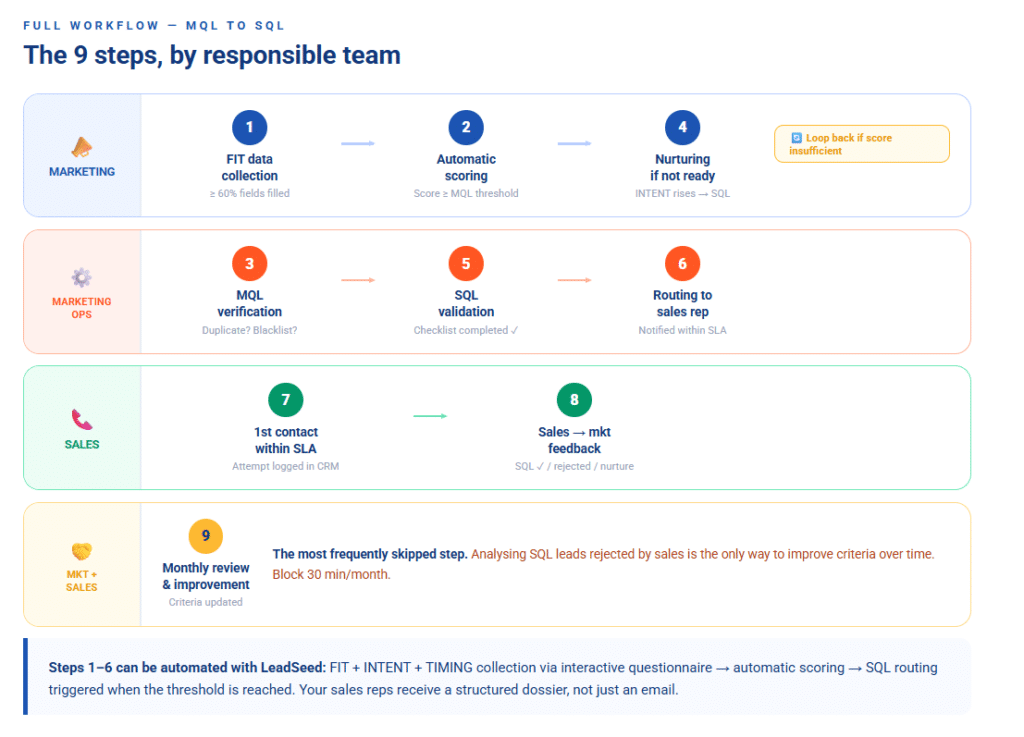
This workflow covers the full lead lifecycle, from first data collection through to sales feedback. Each step specifies who is responsible and what condition must be met to move to the next. Steps 1 to 4 are owned by Marketing, steps 5 to 6 by Marketing Ops, steps 7 to 8 by Sales, and step 9 involves both teams.
| # | Step | Who | Exit Condition |
|---|---|---|---|
| 1 | FIT data collection via form / questionnaire / enrichment | Marketing | FIT fields ≥ 60% complete |
| 2 | Automatic scoring FIT + INTENT + TIMING | Tool / Marketing Ops | Score ≥ defined MQL threshold |
| 3 | MQL verification: consistent data? Duplicate? Blacklist? | Marketing Ops | Lead confirmed MQL |
| 4 | Nurturing if not yet SQL-ready: email sequence or personalised content | Marketing | INTENT score moves toward SQL threshold |
| 5 | SQL validation: SQL-ready checklist completed | Marketing Ops | All criteria checked |
| 6 | Routing to the right sales rep by rules (sector, zone, workload) | Marketing Ops / CRM | Sales rep notified within SLA |
| 7 | First sales contact within SLA timeframe | Sales | Contact made or attempt logged |
| 8 | Sales → marketing feedback: SQL confirmed / rejected / to nurture | Sales | Feedback logged in CRM |
| 9 | Monthly improvement loop: rejection analysis + criteria update | Marketing + Sales | Criteria updated if necessary |
Critical point — step 9 is the most frequently skipped. Without analysing SQL leads rejected by sales, you'll never know why your conversion rate stagnates. Block 30 minutes per month with your sales team for this review.
Before handing a lead to a sales rep, verify these points. If more than 2 boxes are unchecked, return the lead to nurturing.
For reference, the INTENT score is calculated from your prospect's behavioural signals (page visits, downloads, demo requests…). The SQL threshold is the minimum score at which you consider a lead ready for a sales contact. Both values should be defined with your team in the Config tab of the Excel template.
FIT
INTENT
TIMING
DATA
Don't track 20 metrics. Start with these 4. A few useful definitions: the SLA (Service Level Agreement) is the time commitment between receiving an SQL and making first sales contact — typically expressed in business days. The feedback completion rate measures whether your sales reps are following the process by logging the final status of each lead received.
| KPI | What it reveals |
|---|---|
| MQL → SQL conversion rate | Quality of your scoring and criteria |
| SQL rejection rate by sales | Marketing/sales misalignment on SQL definition |
| Average SQL processing time | SLA compliance by sales reps |
| Feedback completion rate | Process adoption by sales reps |
A high SQL rejection rate is often the first signal that you need to revisit your criteria, not your tools.
Download the free LeadSeed Excel template
5 tabs included:
This workflow assumes you have the data needed to score each lead. In practice, FIT information is collected via forms, enrichment or the CRM. INTENT signals come from behavioural tracking. TIMING, however, is almost never collected automatically, you have to ask for it explicitly.
That's where interactive content makes a difference. An online questionnaire or self-diagnostic allows prospects to declare their own TIMING criteria (active project, timeline, budget), provide precise FIT data, and generate strong INTENT signals, all in the same exchange.
This is where LeadSeed works at two levels. First on collection and scoring: the prospect answers 5 to 10 questions, LeadSeed automatically calculates a FIT + INTENT score from the responses, without manual entry. When the score reaches your SQL threshold, routing to the right sales rep triggers automatically. Then on delivery: the prospect receives a personalised report or recommendation based on their answers, while your team receives a structured qualification dossier — ready to feed directly into your SQL workflow.
The result: steps 1 to 6 of your workflow run without human intervention and your sales reps receive a complete dossier, not just a name and an email address.
👉 Want to see how an interactive qualification journey integrates with your MQL → SQL workflow? Request a LeadSeed demo

